
5 Common Mistakes in Cambridge A-Level Computer Science 9618 Exams

Cambridge’s June 2023 examiner reports reveal a clear pattern. Students lose marks not because they don’t understand computer science, but because they misinterpret what examiners want. After analyzing official examiner feedback across Papers 1, 2, 3, and 4, five critical mistakes emerge repeatedly.
Need expert learning support? Check out our online tutoring
What Students Are Getting Wrong
Based on Cambridge examiner reports from 2023, students struggle with:
- Writing pseudocode that matches CIE syntax instead of using programming language code
- Answering the specific question asked rather than providing generic textbook knowledge
- Understanding command words like “explain” versus “state”
- Using technical terminology correctly at A Level standard
- Following the official pseudocode guide for date functions and file operations
These aren’t knowledge gaps. These are execution errors that cost you marks even when you understand the concepts.
Mistake 1: Ignoring Command Words
The Problem:
Examiners repeatedly note that students treat all questions the same way. A question starting with “explain” gets the same type of answer as one starting with “state.”
Real Example from June 2023 Papers:
Question: “Explain why the programmer would choose to use an interpreter while writing code.”
Common wrong answer: “An interpreter translates code line by line.”
This answer describes what an interpreter does, not why a programmer would choose it. The command word is “explain,” which requires reasoning.
Correct answer approach: “An interpreter makes debugging easier because errors are identified line by line as the code executes, allowing the programmer to locate and fix problems during development without waiting for full compilation.”
Why This Matters:
According to examiner reports, vague answers like “an interpreter makes debugging easier” without explaining how or why do not earn full marks. A Level requires detailed technical reasoning.
How to Fix It:
State: Give factual information without elaboration. Describe: Provide characteristics and features with some detail. Explain: Give reasons why something happens or why choices are made, including cause and effect.
Before writing any answer, circle the command word and ask yourself what type of response it requires.
To maximize your marks, you must visualize the ‘ladder’ of complexity. The diagram below illustrates how the requirements increase from ‘State’ to ‘Explain’.
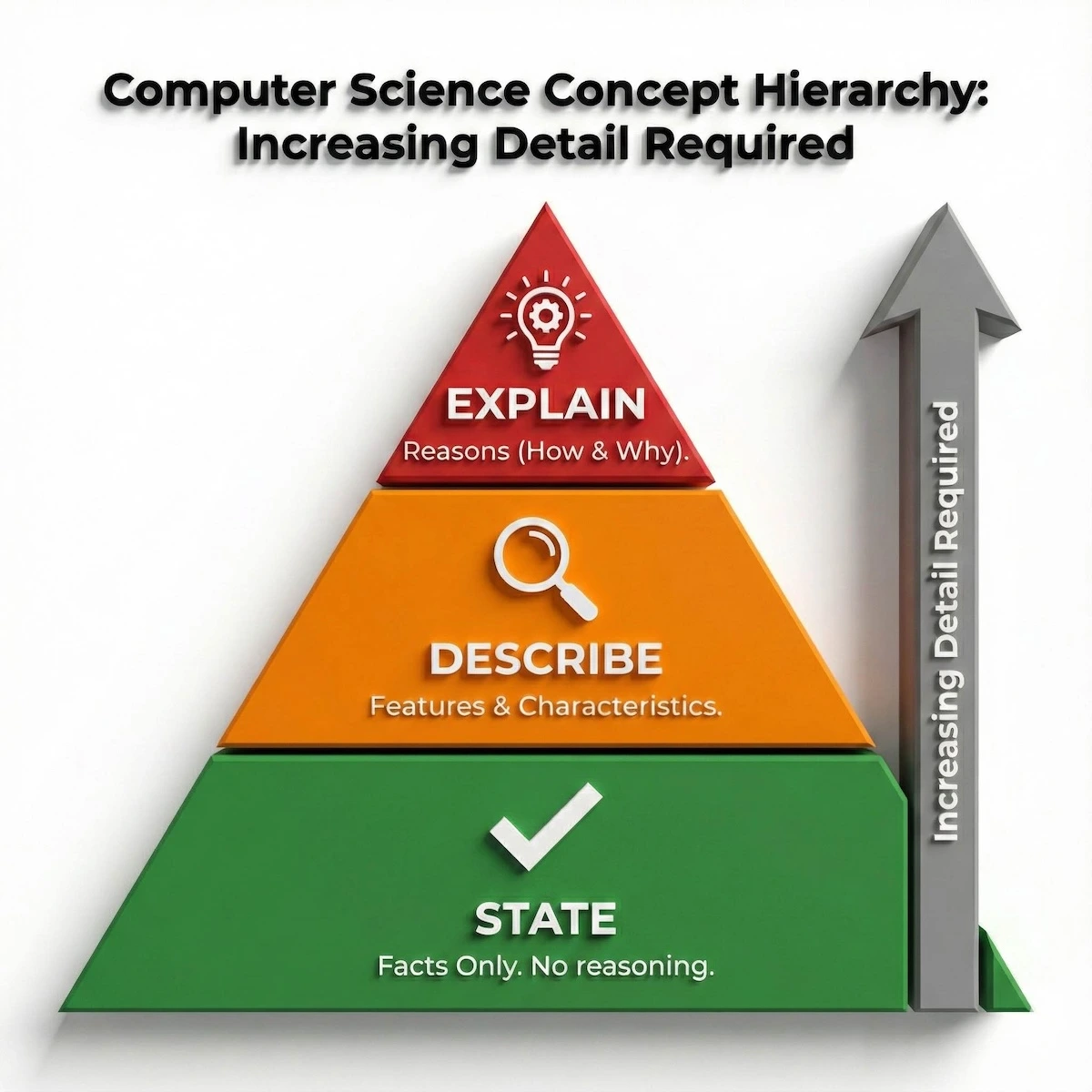
Understand the level of detail required for each command word to maximize your marks.
As you can see, ‘Explain’ sits at the top because it requires you to provide the reasoning (the ‘why’), whereas ‘State’ only asks for the facts.
Mistake 2: Writing Programming Language Code Instead of Pseudocode
The Problem:
Paper 2 questions explicitly require pseudocode, but students submit Python, Java, or Visual Basic code instead. Examiners cannot award marks for programming language syntax.
Real Example from June 2023:
Students were asked to write pseudocode for date assignment:
StartDate ← SETDATE(15, 11, 2005)
Common errors included:
- Using Python syntax: StartDate = datetime.date(2005, 11, 15)
- Including data types in the wrong places: StartDate ← SETDATE(15, 11, 2005) RETURNS DATE
- Omitting the official SETDATE function entirely
Why This Matters:
The Cambridge pseudocode guide provides specific functions like SETDATE, LENGTH, MID, OPENFILE. Using anything else, including language-specific methods, earns zero marks. Examiner reports state clearly that “candidates should be aware that the use of language-specific functions or methods that do not appear in the insert will not gain credit.”
It is easy to accidentally slip into Python syntax during an exam. Use this comparison table to spot the most common syntax errors before you make them.
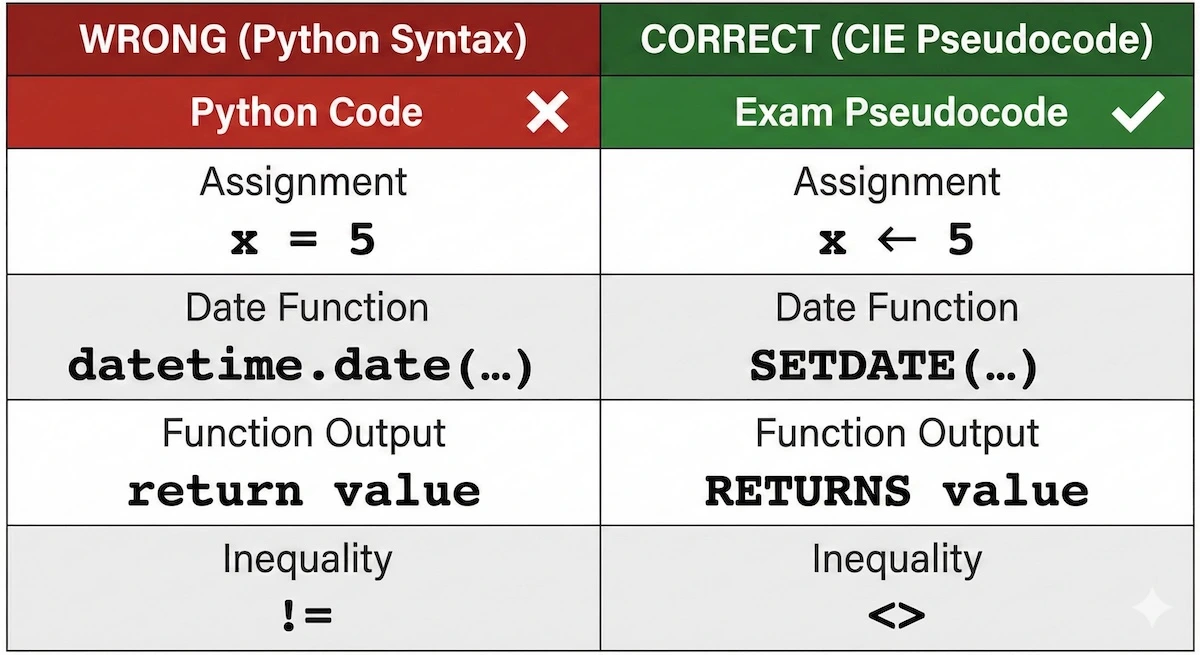
Don’t lose marks by using Python syntax. Stick to the official CIE pseudocode rules.
Note specifically the assignment operator: using an equals sign (=) instead of the arrow (←) is one of the most frequent reasons students lose marks.
How to Fix It:
Keep the official 9618 pseudocode guide open during practice. Memorize these critical syntax rules:
Assignment operator: ← not = String functions: LENGTH, MID, LEFT, RIGHT (from the insert) Date functions: SETDATE, DAYINDEX, MONTH, YEAR
File operations: OPENFILE, CLOSEFILE, READFILE, WRITEFILE (with quotes around filenames) Loops: FOR…NEXT, WHILE…ENDWHILE, REPEAT…UNTIL Selection: IF…THEN…ELSE…ENDIF, CASE…OF…ENDCASE
When writing functions, use RETURNS, not return statements from your programming language.
Check out smart test prep solutions to score higher
Mistake 3: Providing Generic Answers Without Context
The Problem:
Examiners report that many answers could apply to any situation, not the specific scenario in the question. Students write textbook definitions instead of applying knowledge to the given context.
Real Example from June 2023 Paper 1:
Question: “Describe how defragmentation can improve computer performance.”
Common wrong answer: “Defragmentation rearranges fragmented files on the hard drive.”
This describes the process but doesn’t explain how it improves performance. The question asks specifically about performance improvement.
Correct answer approach: “Defragmentation stores file parts contiguously, reducing the number of disk seeks required to read a file. This decreases read/write access time and improves system response speed.”
Why This Matters:
Examiner reports consistently state that vague statements earn no credit at A Level. For example, answers like “DRAM is faster” or “magnetic storage is cheaper” without specifying faster/cheaper than what or by what measure are insufficient.
How to Fix It:
Read the scenario carefully. If a question mentions a specific system (print queue, student database, network setup), your answer must reference that exact scenario.
Use technical precision:
- Not “saves space” but “reduces storage requirements by X method”
- Not “is faster” but “has shorter access time because of Y”
- Not “is better” but “provides Z benefit in this situation”
Include the “so what” in every answer. State the feature, then explain its consequence in context.
Mistake 4: Misusing Technical Terminology
The Problem:
Students use computer science terms incorrectly or interchangeably when they have distinct meanings at A Level.
Real Examples from June 2023 Reports:
Data Integrity vs. Data Accuracy:
Wrong: “Data integrity makes sure the data is correct.”
Correct: “Data integrity ensures data remains consistent and up to date across the database through referential integrity and validation rules.”
Integrity relates to consistency and following rules. Accuracy relates to whether data correctly represents real-world facts.
Validation vs. Verification:
Students often describe one when asked for the other. Validation checks if data meets specified rules (format check, range check). Verification checks if data was entered correctly (double entry, visual check).
Stack vs. Queue:
Examiner reports note students confuse push/pop (stack) with enqueue/dequeue (queue) operations and misunderstand FIFO vs. LIFO structures.
How to Fix It:
Create a terminology comparison table for easily confused concepts:
| Term | Definition | Example |
| Validation | Checks data meets format rules | Range check: age between 0-120 |
| Verification | Checks data entered correctly | Double entry of email address |
| Data integrity | Maintains consistency across database | Foreign keys prevent orphaned records |
| Data accuracy | Data matches real-world facts | Address typed correctly |
When using technical terms in exam answers, add a brief qualifier to show you understand the precise meaning.
These terms are often used interchangeably in casual conversation, but in Computer Science, they are distinct. This matrix breaks down the key differences:
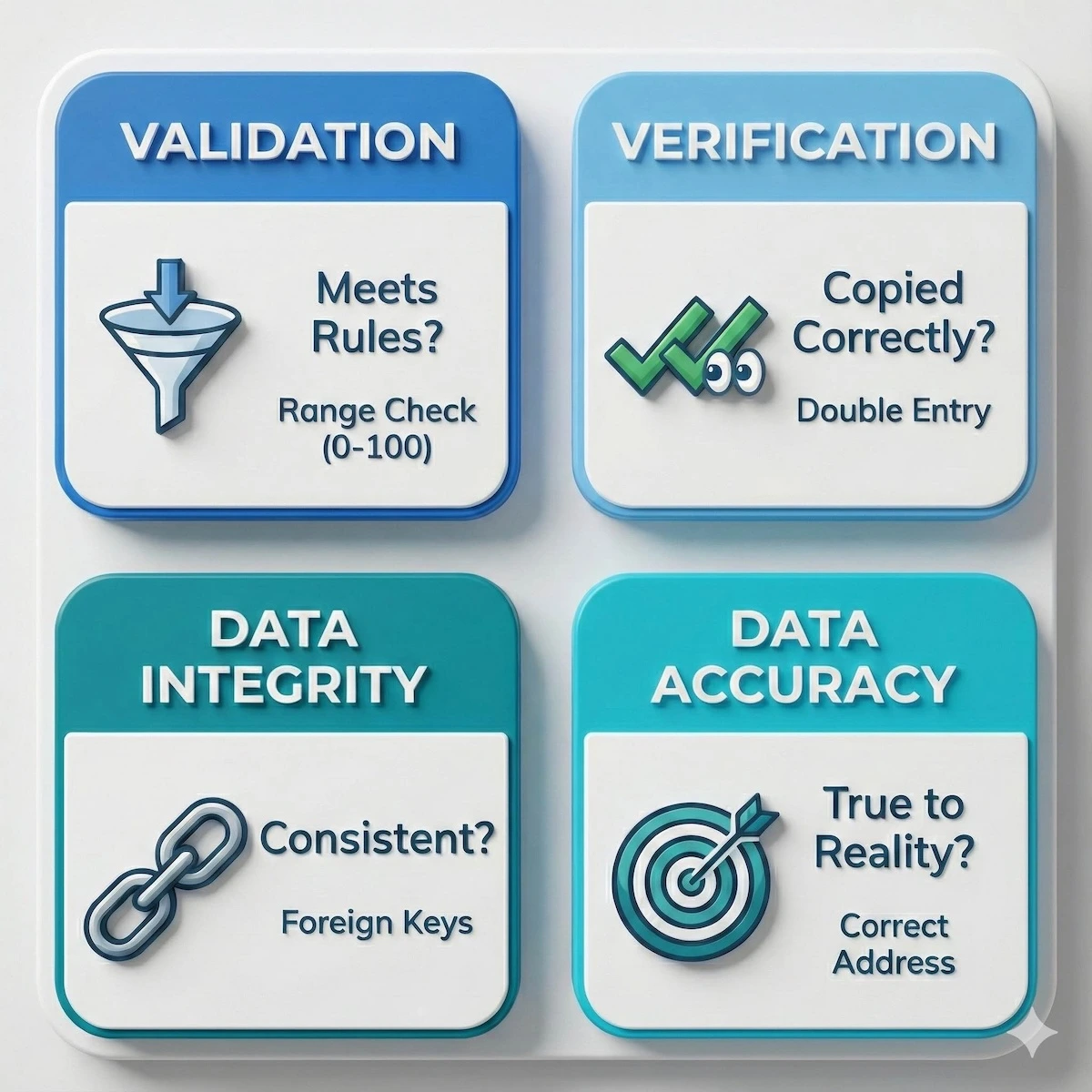
Quick reference guide to distinguish easily confused technical terms.
Memorize these quadrants. Knowing that ‘Validation’ checks rules while ‘Verification’ checks consistency is often the difference between a pass and a distinction.
Mistake 5: Incomplete File Handling in Pseudocode
The Problem:
Students frequently omit critical syntax elements when working with files, particularly quotation marks and proper file modes.
Real Examples from June 2023 Paper 2:
Common errors:
- Opening files without quotation marks: OPENFILE StudentData.txt FOR READ
- Not closing files after use
- Wrong file modes (WRITE when READ is needed)
- Missing EOF checks in loops
- Forgetting CLOSEFILE entirely
Why This Matters:
Examiner reports state explicitly that “a number of candidates lost a mark for not putting quotes around the file name when writing the instruction to open and/or close the file.” This is a one-mark penalty that repeats every time you handle files.
The Correct Pattern:
OPENFILE “DataFile.txt” FOR READ
WHILE NOT EOF(“DataFile.txt”)
READFILE “DataFile.txt”, RecordVariable
// process the record
ENDWHILE
CLOSEFILE “DataFile.txt”
Visualizing the file handling routine as a closed loop can help you remember every step. Follow this flowchart for every file question:
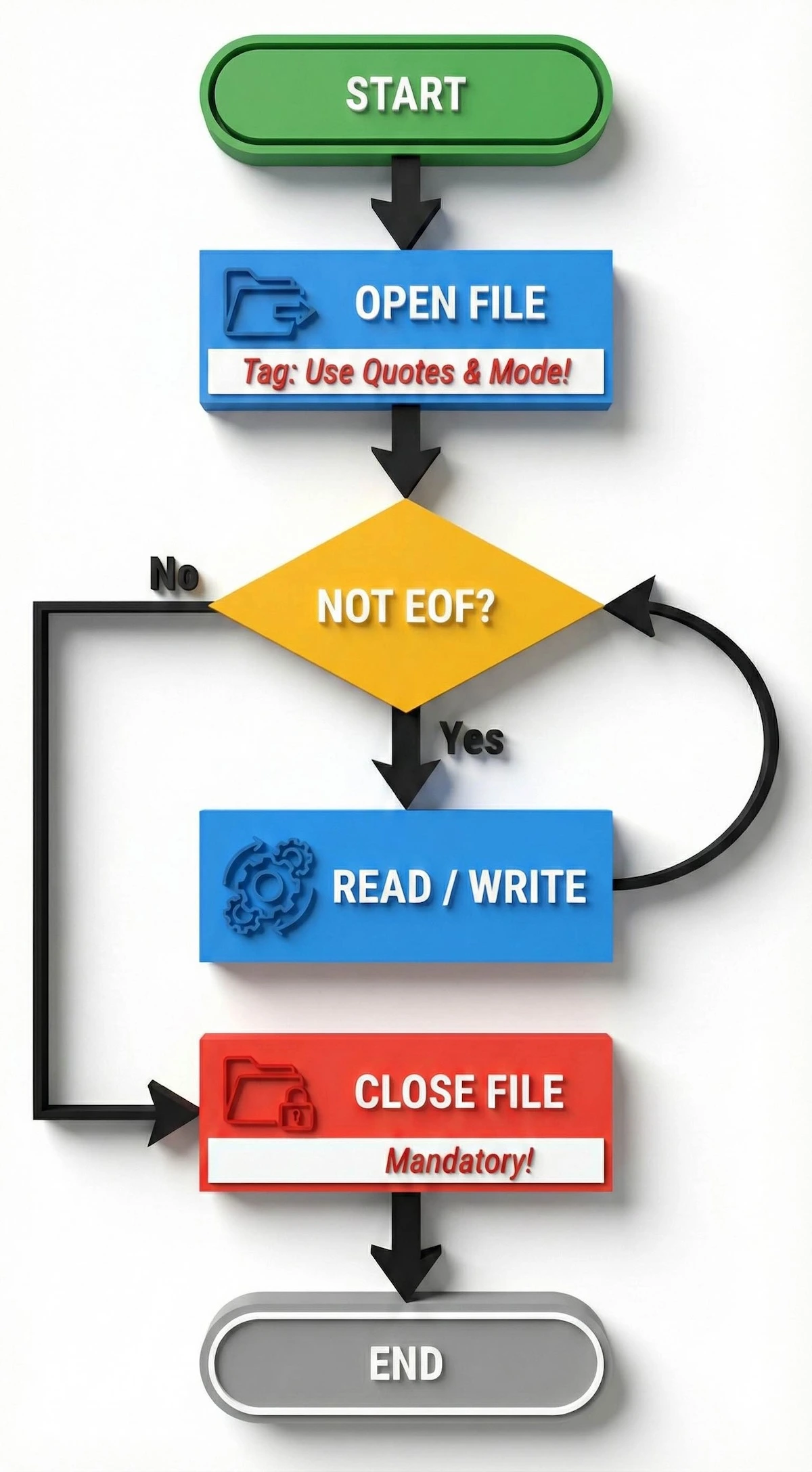
Follow this loop to ensure you never miss a mark for file modes or closing files.
The most critical step in this flow is the final one: CLOSEFILE. If your loop doesn’t make it to that red box, your solution is incomplete.
How to Fix It:
Memorize this file handling checklist:
- Filename in double quotes: “Filename.txt”
- Specify mode: FOR READ, FOR WRITE, FOR APPEND, FOR RANDOM
- Use EOF() function with filename parameter: EOF(“Filename.txt”)
- Always close files: CLOSEFILE “Filename.txt”
- For random files, use SEEK before GETRECORD/PUTRECORD
When writing pseudocode solutions, double-check every file operation against this list before moving on.
Read more to get instant, accurate homework help
Common Pitfalls Across All Papers
Based on the examiner reports, several issues appear across multiple papers:
Over-explaining When Not Required:
If a question asks for two benefits and gives numbered spaces, only the first answer in each space is marked. Writing five benefits in space one means four are ignored.
Not Showing Working:
Questions requiring calculations must show intermediate steps. Writing only the final answer earns partial credit at best. Examiners note that “sometimes the working space was covered with numbers but none of them were labeled as the answer.”
Assuming vs. Reading:
Students assume they know what a question wants based on topic alone. The June 2023 reports repeatedly state “candidates needed to read the question carefully.” For example, if asked about circuit switching, don’t compare it to packet switching unless explicitly asked for comparison.
Rough Work Not Crossed Out:
If you write draft answers, cross them out clearly. Examiners cannot determine which version to mark if multiple answers exist.
Function Return Values:
Many students confuse OUTPUT with RETURN in functions. Functions must RETURN a value. Outputting doesn’t provide a return value for use in the calling code.
Practice Strategy That Works
The most effective preparation method identified from high-performing students:
- Get past papers for Papers 2, 3, and 4 (2021-2024 series)
- Attempt questions under timed conditions without looking at mark schemes
- After completing each question, compare your answer to both the mark scheme and the examiner report
- Identify whether marks were lost due to knowledge gaps or execution errors
- For execution errors, rewrite the answer focusing on command words, technical precision, and proper syntax
- Keep a mistake log noting which types of errors you repeat
Passive reading is not enough for the 9618 exam. You need an active feedback loop. This cycle demonstrates the most effective way to structure your revision:
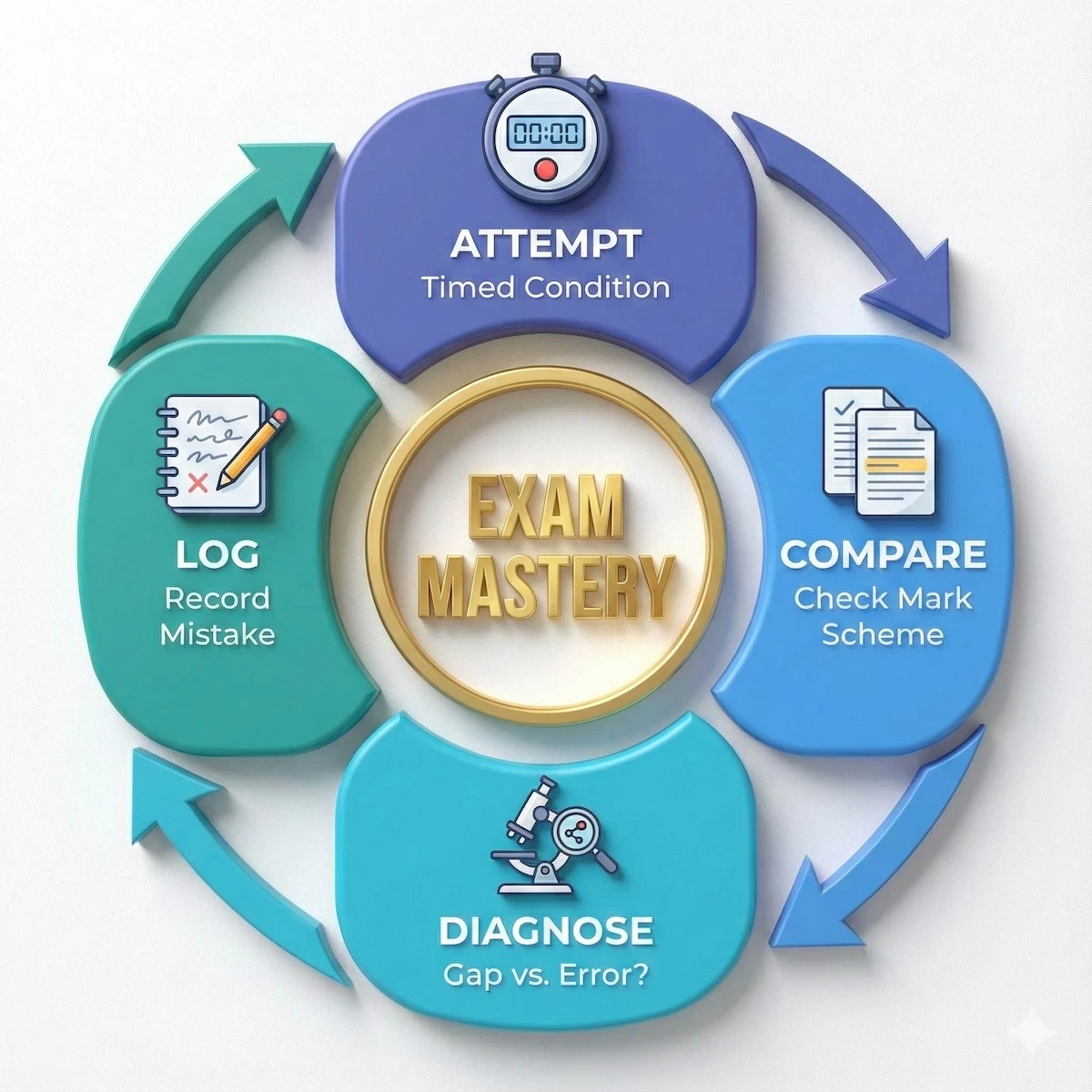
Use this iterative cycle to turn past paper practice into guaranteed improvement.
The ‘Log’ phase is where the real learning happens. By recording your specific error type, you prevent yourself from making the same mistake twice.
This process trains you to think like an examiner, not just know the content.
Key Takeaways
- Command words determine answer type. “Explain” requires reasoning with technical detail, not just descriptions.
- Use only CIE pseudocode syntax from the official guide. Programming language code earns zero marks on Paper 2.
- Answer the specific question with context-specific responses, not generic textbook knowledge.
- Use technical terminology precisely. Data integrity, validation, verification, and accuracy have distinct meanings.
- File handling requires exact syntax: quotes around filenames, correct modes, and always close files.
Your Next Steps
After reading this, you should understand the five mistake patterns and be able to identify them when practicing past papers. Exam success in 9618 requires both content knowledge and execution discipline.
The students who score highest don’t necessarily know more computer science. They know how to communicate what they know in the exact format examiners require. Focus your revision on eliminating these five mistakes and you’ll immediately see better performance in practice papers.
Start by taking one past Paper 2 question. Before writing your answer, identify the command word, confirm you’re using CIE pseudocode syntax from the insert, and check that your answer addresses the specific scenario given. That’s the foundation of exam technique for 9618.
******************************
This article provides general educational guidance only. It is NOT official exam policy, professional academic advice, or guaranteed results. Always verify information with your school, official exam boards (College Board, Cambridge, IB), or qualified professionals before making decisions. Read Full Policies & Disclaimer , Contact Us To Report An Error
