
Linear Regression Interpretation and Diagnostics: A Complete Guide

- R² measures how much of y’s variation x explains, but does not imply causation.
- Four assumptions must hold: linearity, independence, homoscedasticity, and normality of residuals.
- Always inspect residual plots and Q-Q plots before trusting any regression model.
- VIF above 10 signals severe multicollinearity; remove a variable or use ridge regression.
- Cook’s Distance above 1 flags points that may be pulling the regression line.
Linear regression is the workhorse of engineering analysis predicting material strength from temperature, modeling system performance, relating quality metrics to process parameters. Yet most engineers use regression without understanding what the numbers mean or whether the model is valid. An R² of 0.85 sounds good, but if residuals show a funnel pattern (heteroscedasticity), your standard errors are wrong. A regression coefficient might be statistically significant but practically meaningless. This guide teaches you how to interpret regression output and validate assumptions before trusting predictions.
Students working through regression concepts alongside broader quantitative coursework may also benefit from working with an IGCSE Chemistry tutor to see how statistical modelling applies to experimental data.
5 Strategies to Master Cambridge Biblical Studies Essays
Linear Regression Fundamentals
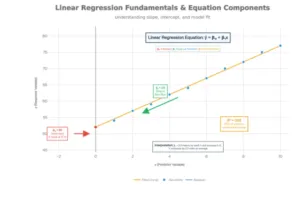
The Regression Equation: ŷ = β₀ + β₁x
ŷ (y-hat): Predicted value of the dependent variable
β₀ (intercept): Y-value when x = 0 (where line crosses y-axis)
β₁ (slope): Change in y for each 1-unit increase in x
x: Independent variable (predictor)
Interpreting Coefficients
Intercept (β₀): Often lacks practical meaning. If x = 0 is outside your data range, the intercept is just a mathematical anchor, not interpretable as a real prediction.
Slope (β₁): THIS is what matters. β₁ = 2.5 means “for each 1-unit increase in x, y increases by 2.5 units on average, holding all else constant.”
Statistical significance of β₁:
- Test using t-statistic: t = β₁ / SE(β₁)
- Compare p-value to α (typically 0.05)
- Small p-value (p < 0.05) means β₁ significantly different from zero
- ≠ Large effect size; statistical significance ≠ practical significance
R² and Adjusted R²
R² (coefficient of determination):
- Measures proportion of y-variance explained by x
- 0 ≤ R² ≤ 1 (0% to 100%)
- R² = 0.85 means x explains 85% of y’s variation; 15% unexplained
- Interpretation caveat: High R² doesn’t mean causation; low R² doesn’t mean model is useless
Adjusted R²:
- Penalizes adding predictors that don’t improve model
- Always ≤ R² (can be negative)
- Preferred for multiple regression with many variables
- Formula: Adjusted R² = 1 – [(1-R²) × (n-1)/(n-k-1)]
- Where n = sample size, k = number of predictors
When R² is low but model is still useful:
- If you’re making predictions in high-variance domains (e.g., stock prices), even R² = 0.30 might be valuable
- Context matters: Chemistry R² = 0.95; ecology R² = 0.40 is acceptable
Quantitative reasoning skills like these transfer across disciplines. Learners preparing for the IB MYP will encounter data interpretation tasks that draw on exactly these coefficient and R² concepts.
Best AI Humanizer Tools for Essays
Assumption Checking and Diagnostics
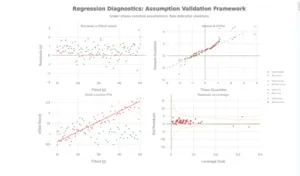
Regression validity depends on four critical assumptions. Violating them leads to unreliable coefficient estimates, biased standard errors, and invalid hypothesis tests.
Assumption 1: Linearity
What it means: Relationship between x and y is linear (straight line, not curved)
How to check:
- Scatter plot of x vs. y: Points should follow roughly straight pattern
- Residuals vs. Fitted plot: No curved pattern (should be random scatter)
- If curved: Linear model is misspecified
If violated:
- Transformation: Log(y) or √x might linearize relationship
- Polynomial regression: Add x² term (quadratic)
- Non-linear regression: Use exponential or power law models
Assumption 2: Independence
What it means: Observations are independent; no autocorrelation (residuals not related to each other)
How to check:
- Data collection method (Was sampling random? Or sequential/clustered?)
- Durbin-Watson test (for time-series data)
- Plot residuals vs. observation order: Should be random pattern
If violated: (Common in time-series, spatial data)
- Use time-series models (ARIMA)
- Add lag variables
- Use mixed effects models accounting for clustering
Assumption 3: Homoscedasticity (Constant Variance)
What it means: Residuals have equal variance across all x values (not heteroscedastic)
How to check:
- Residuals vs. Fitted plot: Should show random scatter with constant spread
- Good: Points scattered evenly around zero
- Bad: Funnel pattern (spread increases/decreases with fitted values)
- Scale-Location plot: Shows √|standardized residuals| vs fitted values
- Good: Horizontal trend line
- Bad: Upward or downward trend
Statistical test: Breusch-Pagan test
- Small p-value (p < 0.05) indicates heteroscedasticity
If violated:
- Weighted least squares regression (weight by 1/variance)
- Variance-stabilizing transformation: Log(y), √y, or 1/y
- Robust standard errors (Huber-White) preserve estimates but correct SE
3 Ways You’re Using Science Past Papers Wrong
Assumption 4: Normality of Residuals
What it means: Residuals follow normal distribution with mean = 0
How to check:
- Normal Q-Q plot: Points should follow diagonal line
- Good: Close to straight line throughout
- Bad: S-shaped curve (heavy tails), systematic deviation at ends
- Histogram of residuals: Should be bell-shaped
- Shapiro-Wilk test: p < 0.05 indicates non-normality
Visual interpretation patterns:
- Upper tail deviation: Right skew or outliers
- Lower tail deviation: Left skew or outliers
- S-shaped pattern: Heavy tails (more extreme values than normal)
If violated:
- For large samples: Central Limit Theorem makes this less critical
- Box-Cox transformation can normalize residuals
- Robust regression (reduce outlier influence)
- Non-parametric regression alternatives
Identifying Influential Points and Outliers

Not all outliers affect regression equally. Understanding leverage, residuals, and influence is critical.
Three Types of Unusual Points
Outlier: Unusual y-value (large residual) but x-value in normal range
- Issue: Violates normality assumption
- Influence: Low if near center of x-distribution
- Fix: Transform data, check for data entry errors, robust regression
Leverage Point: Unusual x-value (far from x-mean) but y follows regression line
- Issue: Point follows pattern but far from others
- Influence: CAN inflate R² and statistical significance even though coefficient unchanged
- Fix: Usually keep (if valid); note in report
Influential Point: Both unusual x and large residual; pulls regression line
- Issue: Significantly changes slope or intercept if removed
- Influence: CRITICAL—coefficient estimates unreliable
- Fix: Investigate data quality; consider robust regression; report sensitivity
Detecting Influential Points: Cook’s Distance
Cook’s Distance formula: D_i = (Residual_i)² / (p × MSE) × Leverage_i
Interpretation:
- D < 0.5: Not influential
- 0.5 < D < 1.0: Somewhat influential; investigate
- D > 1.0: Highly influential; likely problematic
- Rule of thumb: D > 4/n indicates influential outlier
Example:
- Sample size n = 50
- Threshold: 4/50 = 0.08
- Points with D > 0.08 are influential outliers
How to handle:
- Verify data quality: Is it a data entry error? Measurement error?
- Understand context: Is it a legitimate extreme value?
- Sensitivity analysis: Refit without point; compare coefficients
- Report: Always mention influential points in analysis
- Robust regression: Reduces influence of outliers
Physics-based modelling courses that involve regression diagnostics are common in advanced curricula. Students studying for AP Physics C often encounter influential-point analysis when fitting experimental data.
Engineering Applications
Application 1: Predicting Material Strength from Temperature
Scenario: Steel tensile strength (MPa) predicted from temperature (°C)
Data: 22 measurements from -320°F to +80°F
Regression model: Strength = β₀ + β₁ × Temperature
Result from NIST data:
- As temperature increases, steel strength decreases
- Linear relationship explains 94% of variation (R² = 0.94)
- Coefficients quantify strength loss per degree
- Used for structural safety analysis in fire conditions
Diagnostics to check:
- Residuals vs. Fitted: Constant variance across temp range?
- Q-Q plot: Residuals normally distributed?
- Influential points: Are extreme temps unduly influential?
- Prediction intervals: How wide for future measurements?
Application 2: Quality Control — Relating Defect Rate to Process Temperature
Scenario: Electronics manufacturing
- Response: Defect rate (%)
- Predictor: Reflow oven temperature (°C)
Model: Defect_Rate = β₀ + β₁ × Oven_Temp
Expected pattern:
- Temperature too low → high defects (cold solder joints)
- Temperature optimal → low defects
- Temperature too high → high defects (component damage)
- Non-linear U-shaped pattern
Regression issue: Simple linear regression won’t fit U-shape!
Solution: Add quadratic term
- Model: Defect = β₀ + β₁ × Temp + β₂ × Temp²
- Now captures optimal temperature and tail-off effects
Engineering insight: Check residuals vs. fitted; if curved pattern, polynomial needed
Application 3: System Performance Modeling
Scenario: Server processing time vs. CPU load
Linear regression: Processing_Time = β₀ + β₁ × CPU_Load
Typical result: As CPU load increases, processing time increases linearly (slope positive)
Multicollinearity issue: If you have multiple CPU cores, memory usage, disk I/O as predictors
- These are often correlated with each other
- Use VIF to detect: VIF > 10 for any predictor?
- Solution: Remove less important correlated predictor or use ridge regression
Understanding how behavioural and cognitive variables interact in models is also relevant in social sciences. Students taking AP Psychology often apply regression thinking when evaluating research study designs.
Biology Technique Errors That Are Losing You Marks
Multiple Regression and Multicollinearity
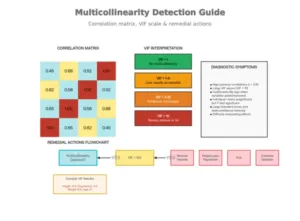
What is Multicollinearity?
Definition: When two or more predictor variables are highly correlated with each other
Why it’s a problem:
- Inflates standard errors of coefficients
- Makes estimates unstable (small data change → large coefficient change)
- Coefficients become hard to interpret
- Hypothesis tests become unreliable (wide confidence intervals)
Detecting Multicollinearity
Method 1: Correlation Matrix
- Calculate pairwise correlations between predictors
- Correlation > 0.8 suggests potential multicollinearity
- Limitation: Only detects pairwise; misses multi-way correlations
Method 2: Variance Inflation Factor (VIF)
- Calculated for EACH predictor
- VIF_j = 1 / (1 – R_j²)
- Where R_j² is R² from regressing predictor j on all other predictors
VIF interpretation:
- VIF = 1: No multicollinearity (ideal)
- VIF 1-4: Low; usually acceptable
- VIF 4-10: Moderate; investigate
- VIF > 10: Severe; take action
Example: If VIF_Weight = 8.42, variance of weight coefficient is 8.42 times inflated due to correlation with other predictors
Fixing Multicollinearity
Option 1: Remove Variable (Simplest)
- Drop the less important correlated predictor
- Trade-off: Lose information, but gain interpretability
- Use case: When one variable is clearly secondary
Option 2: Ridge Regression
- Shrinks coefficients toward zero
- Reduces variance at cost of bias
- Still includes all predictors
- Use case: Want to keep all variables but stabilize estimates
Option 3: Lasso Regression
- Shrinks some coefficients exactly to zero (variable selection)
- Simultaneously selects variables and reduces multicollinearity
- Use case: Many predictors; want automatic selection
Option 4: Principal Component Analysis (PCA)
- Creates new uncorrelated variables (principal components)
- Trades interpretability for reduced multicollinearity
- Use case: Very high-dimensional data with many correlated variables
Students who want to strengthen their grasp of quantitative methods across science subjects can find support through an IGCSE Arabic 9-1 tutor or explore other subject pages for tailored academic support.
5 Formulas That Separate A/AS-Level Business A Students from the Rest
Software Walkthroughs
Excel
=LINEST(y_range, x_range, TRUE, TRUE)
Returns: slope, intercept, slopes_SE, intercept_SE, R², std_error, F, dof, SS_reg, SS_residual
Manual R² calculation:
=1 – SUMSQ(residuals)/SUMSQ(y – AVERAGE(y))
Prediction with confidence interval:
Point estimate: β₀ + β₁ × x_new
SE(pred) = √[MSE × (1 + 1/n + (x_new – x̄)²/Σ(x-x̄)²)]
Interval: Estimate ± t_critical × SE(pred)
R
# Fit linear regression
model <- lm(y ~ x, data = mydata)
# Summary statistics
summary(model) # Coefficients, p-values, R², F-test
confint(model) # 95% CI for coefficients
# Diagnostics
plot(model) # 4-panel diagnostic plots
par(mfrow=c(2,2))
plot(model)
# Specific tests
shapiro.test(residuals(model)) # Normality test
lmtest::bptest(model) # Heteroscedasticity test (Breusch-Pagan)
car::vif(model) # VIF for multicollinearity
# Influence diagnostics
cooks.distance(model) # Cook’s distance
hatvalues(model) # Leverage values
rstudent(model) # Studentized residuals
# Multiple regression with interactions
model2 <- lm(y ~ x1 + x2 + x1:x2, data = mydata)
# Ridge regression (for multicollinearity)
library(glmnet)
ridge_model <- glmnet(x_matrix, y, alpha=0)
Python (scikit-learn, statsmodels)
# Using statsmodels (more diagnostic output)
import statsmodels.api as sm
import numpy as np
# Add constant for intercept
X = sm.add_constant(X)
model = sm.OLS(y, X).fit()
# Summary
print(model.summary()) # Full regression summary
# Diagnostics
from statsmodels.graphics.gofplots import ProbPlot
import matplotlib.pyplot as plt
fig, axes = plt.subplots(2, 2)
fig = sm.graphics.plot_partregress_grid(model, fig=fig)
plt.show()
# VIF
from statsmodels.stats.outliers_influence import variance_inflation_factor
vif = [variance_inflation_factor(X.values, i) for i in range(X.shape[1])]
# Cook’s distance
from statsmodels.graphics.gofplots import OLSInfluencePlots
influence_plot(model)
# Using scikit-learn (simpler)
from sklearn.linear_model import LinearRegression
model_sk = LinearRegression().fit(X, y)
r2 = model_sk.score(X, y)
SPSS
Analyze → Regression → Linear
– Dependent: y variable
– Independent(s): x variable(s)
– Statistics: Estimates, Model Fit, Descriptives, Diagnostics
– Plots: Residuals plots (Standardized vs. Predicted)
Output includes:
– ANOVA table (F-test for overall significance)
– Coefficients table (β, SE, t, p-value)
– Diagnostics (R², Durbin-Watson)
Common Mistakes and How to Avoid Them
Mistake 1: Correlation ≠ Causation
Example: Ice cream sales correlate with drowning deaths.
- Correlation: 0.92 (very strong)
- Causation: Neither causes the other; both caused by summer temperature
In regression: A significant β₁ doesn’t prove x causes y
- Could be reversed causation
- Could be confounding variable
- Could be coincidence with spurious association
How to avoid:
- Use controlled experiments, not observational data
- Report correlations, not causal claims
- Acknowledge limitations
Mistake 2: Using Regression Outside Data Range (Extrapolation)
Example: Temperature range in data: 0–100°C
- Using model to predict strength at 500°C
- Relationship may become non-linear outside observed range
- Prediction interval explodes as x moves away from data mean
How to avoid:
- Note prediction intervals: wider at extremes
- Don’t extrapolate beyond ±10% of observed x range
- Add warning: “Predictions outside observed range unreliable”
Mistake 3: Ignoring Multicollinearity
Example: Predicting price with Height AND Weight (highly correlated)
- Both individually significant (p < 0.05)
- But standard errors so large that individual slopes unreliable
- Coefficients flip sign if you drop one variable
How to avoid:
- Always calculate VIF: car::vif(model) in R
- If VIF > 10: Remove variable or use ridge regression
- Report VIF in analysis
Mistake 4: Assuming Residuals Are Normal
Example: Regression on percentage data (0–100%)
- Residuals tend to be non-normal (bounded)
- Normal regression inappropriate; use logistic regression instead
How to avoid:
- Always check Q-Q plot
- Run Shapiro-Wilk test
- If non-normal: Transform (log, sqrt) or use robust regression
Mistake 5: Ignoring Heteroscedasticity
Example: Predicting error rate by part size
- Small parts: measurement error ±1%
- Large parts: measurement error ±5%
- Variance increases with part size (heteroscedasticity)
- Standard errors underestimated
How to avoid:
- Plot residuals vs. fitted values
- Breusch-Pagan test for heteroscedasticity
- If heteroscedastic: Weighted least squares or variance transformation
Practice Problems with Solutions
Problem 1
A manufacturer collects 30 samples relating oven temperature (°C) to defect rate (%). Data summary: x̄ = 200, s_x = 15, ȳ = 5.2, s_y = 2.1, r = -0.82
Calculate the regression equation.
Solution:
β₁ = r × (s_y / s_x) = -0.82 × (2.1 / 15) = -0.1148
β₀ = ȳ – β₁ × x̄ = 5.2 – (-0.1148) × 200 = 28.16
Regression equation: Defect_Rate = 28.16 – 0.1148 × Temperature
Interpretation: Each 1°C increase in temperature reduces defect rate by 0.115% on average.
Problem 2
A regression model shows:
- R² = 0.88
- Residuals vs. Fitted plot shows funnel pattern (increasing spread)
- Normal Q-Q plot shows S-shaped curve
What problems exist? How to fix?
Solution:
Problems identified:
- Heteroscedasticity: Funnel pattern indicates non-constant variance
- Non-normality: S-shaped Q-Q suggests heavy tails or skew
Fixes:
- Apply weighted least squares with weights = 1/variance
- Try variance-stabilizing transformation: Log(y) or √y
- Use robust standard errors (preserves estimates, corrects SE)
- Check for outliers pulling tails
Related Reading
******************************
This article provides general educational guidance only. It is NOT official exam policy, professional academic advice, or guaranteed results. Always verify information with your school, official exam boards (College Board, Cambridge, IB), or qualified professionals before making decisions. Read Full Policies & Disclaimer , Contact Us To Report An Error
