
Plus AI vs Slidesgo and 5 Other AI Slide Makers Ranked for 2026

- Plus AI works inside Google Slides and PowerPoint, making it the fastest native option.
- Slidesgo offers 10,000+ designer templates for quick, visually polished decks.
- Beautiful.ai locks brand fonts and colors across every slide your team generates.
- PowerPoint Copilot pulls live data from SharePoint and Excel within Microsoft 365.
- Security compliance varies widely — SOC 2 status differs by platform.
You know the drill: a client meeting hits the calendar and suddenly you’re staring at a blank deck. Turning notes into a polished, on-brand presentation can swallow 20–40 working hours before you even click Present (drivers lose about 17 hours each year creating slides, according to SlideGenius).
AI slide generators aim to give that time back. In just two years they’ve jumped from gimmick to trusted co-designer, drafting and styling slides in minutes. Yet abundance breeds confusion. The question we hear most is, “Should I use Plus AI or Slidesgo, and what about the newcomers on Product Hunt?”
We built a transparent, six-point scoring framework to find out. Students working on technical presentations — whether in computer science or engineering disciplines — will find these tools especially useful for turning dense material into clear slides. Ready to reclaim those hours? Read on.
How We Ranked the Tools
Before we name a winner, we owe you a clear scoreboard.
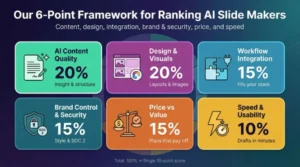
We built a six-point framework that measures what truly matters when you open a blank deck on Monday morning and need finished slides by noon.
First, AI content quality. We asked every tool to turn the same one-page brief into a 10-slide outline, then graded for insight, structure, and minimal fluff. If slides needed heavy rewriting, the score dropped.
Second, design and visuals. A presentation lives or dies on looks. We judged each platform’s default layouts, typography choices, and image handling. Tools that auto-apply balanced spacing and brand colors earned top marks.
Third, workflow integration. You should not rebuild your process just to use AI. We favored add-ins that sit inside Google Slides or PowerPoint and web apps that export clean .pptx files without breaking formatting.
Fourth, brand control and security. Enterprises need locked fonts as much as locked data. We verified SOC 2 badges, SSO options, and whether admins can enforce a style guide across every new deck. Plus AI, for instance, lists SOC 2 Type II compliance on its security page and lets workspace admins lock corporate fonts, colors, and slide masters directly in Google Slides and PowerPoint.
That checks both the data-protection and brand-governance boxes of our framework scores.
Fifth, price versus value. We compared free tiers, monthly fees, and any credit systems against the real output quality. A bargain that produces generic slides is no bargain at all.
Finally, speed and usability. We timed how long it took a first-time user to reach a presentable draft and noted any interface hiccups that slow momentum.
Each criterion carries a weight: content and design at twenty percent each; integration and brand/security at fifteen percent; price at fifteen percent; speed at ten percent. Scores roll into a single ten-point rating you will see in the mini-reviews that follow. Researchers in fields like biomedical engineering who regularly present complex data will recognize why these criteria matter.
With the rules of the game set, we can meet the contenders.
Plus AI: Best Overall
Plus AI tops our list because it places generative tech inside the slide editors you already open every day.
Open Google Slides or PowerPoint and a Plus sidebar appears. Type a prompt, paste an outline, or upload a long document. Within seconds you have a full deck: titles, bullets, and layout ideas, ready for quick tweaks. No exports, extra log-ins, or file-format drama.
 Plus AI Sidebar Inside Google Slides Showing Full Deck Generation.
The results impressed us. Slide structure followed a clear story arc, and the AI suggested punchy section headers. When we asked it to remix a cluttered slide, Plus split dense paragraphs into crisp bullets and balanced white space automatically.
According to Plus, the add-in counts roughly 1 million installs and 900 public reviews, averaging 4.6 stars on the Google Marketplace. That user base feeds steady feedback and rapid updates.
Pricing stays light. A free tier covers a few decks each month, while the Pro plan at about fifteen dollars unlocks unlimited drafts and a shared theme library for teams.
If you build in Slides or PowerPoint, Plus AI feels less like a new tool and more like a colleague who never tires of formatting. It remains the fastest path we’ve found from blank canvas to board-ready deck.
Slidesgo: Best for Ready-Made Templates
Slidesgo wins the speed contest on visuals alone.
Enter your topic, pick a tone, and within seconds the web app returns a multi-slide deck wrapped in one of 10,000 designer templates. Icons from Flaticon, illustrations from Freepik, and coordinated color palettes make it feel like a press-play design button.
 Slidesgo Template Gallery Showing Multi-Slide AI-Generated Deck Options.
For teachers, students, and marketers who fear blank-slide syndrome, that instant polish is a lifesaver. We used Slidesgo to create a lesson-plan deck on renewable energy. The AI paired clear headline copy with infographic layouts and even suggested royalty-free photos. After a few sentence tweaks and a background swap, the deck was ready in under ten minutes.
Trade-offs remain. You edit inside Slidesgo’s browser editor, then export, often to a static PDF. If you need an editable PowerPoint file or real-time collaboration, consider another option. The visuals shine, but the autogenerated copy can feel generic, so plan to add your own insights.
When a deadline matters more than granular control, Slidesgo’s large template catalog and one-click generation deliver quick, polished slides at freemium prices.
Beautiful.ai: Best for Brand-Perfect Design
Some decks can survive average visuals. Investor pitches, C-suite reports, and high-stakes proposals cannot. That is where Beautiful.ai shines.
Its “Smart Slide” engine polices every pixel. Drop in a new bullet and spacing adjusts automatically. Swap an image and the caption snaps into perfect alignment. The result feels like a meticulous graphic designer who never misses a style guide.
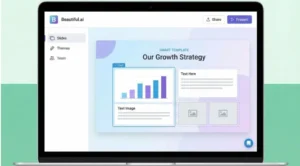 Beautiful.ai Smart Slide Editor with Brand-Locked Design Controls.
We tested the tool by pasting raw survey data into a blank chart slide. Beautiful.ai converted numbers into a color-coordinated bar graph, resized labels for readability, and matched the deck’s accent hue without help. Seconds, not hours.
Brand teams value the control layer on top. Set your company fonts, logos, and color palette once, then lock them. Every future slide your colleagues generate inherits those rules, removing rogue pink headers and Comic Sans mishaps.
The trade-off is creative freedom. If you crave offbeat layouts or experimental typography, the guardrails can feel tight. Exports to PowerPoint also flatten the smart elements, so later edits call for manual nudging.
Even so, for organizations where polish equals credibility, Beautiful.ai removes the last excuse for sloppy slides. It delivers agency-level design on a software subscription. That price still beats another rushed all-nighter in InDesign.
Gamma: Best for Interactive Storytelling
Not every message belongs on static slides. Sometimes you need a living document that readers scroll, click, and explore. Gamma makes that possible.
Feed its AI a brief, a blog post, or raw meeting notes. In one pass the engine drafts a modern, card-based deck, part presentation and part microsite.
Each section expands on click, embeds play inline, and data charts animate as the viewer scrolls. The deck behaves more like the web than a slideshow, so attention stays high.
 Gamma Interactive Card-Based Presentation Layout in Browser.
We pushed Gamma with a 1,500-word product spec. It identified key pillars, drafted concise slide copy, generated hero images with its built-in model, and wrapped everything in a sleek dark theme. Switching to a new theme took one click; exporting to PDF took another. Total time: under 15 minutes.
Freedom comes with trade-offs. Exporting to PowerPoint flattens interactivity and can jumble layouts, so PPT loyalists will face cleanup. Security teams may also pause; Gamma is still chasing the compliance badges established rivals already hold.
For founders, marketers, and educators who share decks as links, Gamma feels lively and modern. It lets you tell stories that unfold instead of flip, landing with every viewer who instinctively reaches for the scroll wheel.
The way AI tools handle long-form source material is also explored in how executives are using AI to digest long documents fast, which offers useful context on AI-driven summarization.
Microsoft PowerPoint Copilot: Best for Corporate Power Users
Sometimes the fastest slide builder is the one that already knows your files, your data, and your company vocabulary. PowerPoint Copilot fits that description.
Because it lives inside Microsoft 365, Copilot can pull from SharePoint, Teams chats, and Excel workbooks. Ask it to “turn last quarter’s revenue report into a 12-slide business review,” and it retrieves the numbers, drafts talking points, and inserts a matching bar chart without leaving PowerPoint.
We tried exactly that. Copilot grabbed the latest spreadsheet, summarized key deltas, suggested a concise executive summary, and sprinkled in design ideas from the corporate template stored on our tenant. The first draft appeared in three minutes. A quick chat prompt trimmed two wordy slides, and the deck was client-ready.
Security officers breathe easier here. Everything stays within your Microsoft tenant under the same compliance framework your organization already trusts. No extra agreements, no third-party uploads.
The trade-off is cost and access. Copilot is a premium add-on that costs about thirty dollars per user each month, and it is currently limited to enterprise and business plans. Small teams may hesitate, but large organizations drowning in slide requests often recover the fee with the first workday saved.
Design flair still rests on you; Copilot relies on standard PowerPoint themes rather than fresh templates. Yet for analysts and managers who live in Excel by morning and present by afternoon, having an AI assistant fluent in their own files offers a clear edge.
Canva Magic Design: Best for Quick Visual Content
If your team already lives in Canva for social posts and flyers, Magic Design turns the same playground into a presentation factory.
Type a prompt such as “quarterly marketing recap,” and Canva produces six slides stocked with stock photos, icons, and on-trend typography. Because the results appear in the familiar drag-and-drop editor, you can nudge any element, swap colors, or add video stickers without hunting for new controls.
The tool feels light but helpful. We used it to start a nine-slide webinar deck. The AI delivered a clean hero cover, a three-point agenda slide, and a matching testimonial layout. After five minutes of manual copy tweaks, the visuals looked conference-ready and matched our existing Canva brand kit.
Speed comes at the price of depth. Magic Design writes placeholder copy that serves more as suggestions than finished messaging. It also stops around eight slides, so longer narratives still need human elbow grease.
Teams weighing Canva against slide-native AI tools may also want a closer look at how it compares to Plus AI in structured environments like HR training decks, where workflow integration and brand controls matter more than template variety.
For entrepreneurs, teachers, and content creators who value simplicity over corporate requirements, Canva’s AI is the quickest way to dress ideas in professional attire. The feature is already included with the Canva Pro subscription many teams use today.
For a broader look at how AI tools are reshaping student and professional workflows, the ranked review of Chai AI alternatives covers a comparable evaluation approach across a different tool category.
Pitch AI: Best for Real-Time Collaboration
Pitch began as the multiplayer alternative to PowerPoint. With its new AI helper, the platform now feels like a brainstorming session that writes itself.
Open a fresh deck, choose a startup-friendly template, and prompt the assistant: “Outline a five-slide investor update on monthly active users.” Within seconds the slides appear, filled with headline copy, placeholder charts, and image slots. Teammates can jump in at the same time, rewriting bullets or dragging Unsplash images into frames while you watch their cursors move.
In our test, three colleagues edited at once. One asked AI to rephrase a mission statement, another applied a different color theme, and a third recorded a voice-over, all without version-control headaches. The deck evolved in real time, then shared through a single link that tracks viewer analytics.
Limitations persist. There is no offline mode, and exporting to PowerPoint flattens Pitch’s smart layouts. Advanced brand settings also sit behind the enterprise tier.
For distributed teams who craft demos, status updates, and pitch decks together, Pitch AI turns collaboration from a relay race into a group sprint. It keeps momentum high and makes slide building feel social instead of solitary.
Comparison Cheat-Sheets
You now know the story behind each platform. Still, side-by-side snapshots help when the clock is ticking and procurement needs hard data.
Feature Matrix at a Glance
| Tool | Inside Slides/PPT? | Full deck generation | Brand-lock controls | Real-time collaboration | Built-in image AI |
| Plus AI | ✅ | ✅ | Partial (themes) | Uses host app | ❌ |
| Slidesgo | ❌ (web) | ✅ | Minimal | ❌ | ❌ |
| Beautiful.ai | ❌ (web/desktop) | ✅ | Strong | ✅ | ❌ |
| Gamma | ❌ (web) | ✅ | Moderate | ✅ | ✅ |
| PowerPoint Copilot | ✅ | ✅ | Corporate template | ✅ | Via 365 |
| Canva Magic | ❌ (web) | ⚡ Starter only | Brand Kit | ✅ | ❌ |
| Pitch AI | ❌ (web) | ✅ | Enterprise tier | ✅ | ❌ |
Read it like a checklist. If brand governance is critical, Beautiful.ai jumps out. If you want image generation built in, Gamma and Copilot lead the column. And if you never leave PowerPoint, Plus AI and Copilot are the only true natives.
Pricing and Compliance Snapshot
| Tool | Free tier | Key paid plan | SOC 2 status |
| Plus AI | Yes | Pro ≈ $15/user | ✅ |
| Slidesgo | Yes | Premium ≈ $6 | Pending |
| Beautiful.ai | Trial only | Pro $12 | ✅ |
| Gamma | Yes | Plus $8 | In progress |
| Copilot | No | Add-on $30 | ✅ (via Microsoft) |
| Canva Pro | Yes | Pro $15 (5 seats) | ✅ |
| Pitch | Yes | Pro $20/workspace | Pending |
The takeaway: every tool offers a way to test drive, but real power lives behind modest monthly fees, except Copilot, which carries an enterprise-grade price tag.
Use these charts to match needs to budget, then return to the deeper reviews above for nuance. Numbers clarify, context converts.
Who Should Use Which Tool?
Choosing an AI slide maker is less about absolute “best” and more about fit. Match the tool to the context and the decision makes itself.
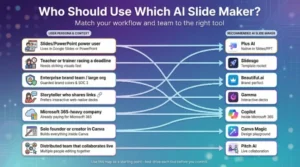
If you spend your day in Google Slides or PowerPoint and want speed without new software, Plus AI is the obvious pick. It drafts, rewrites, and styles inside the apps you already open before coffee.
Need striking visuals in record time with zero design skill? Slidesgo offers thousands of themed templates that look agency-made. Teachers, trainers, and anyone racing a deadline will benefit.
For enterprises where brand teams guard every hex code, Beautiful.ai locks style guides in stone. Set the rules once and every future slide follows them.
Storytellers who share links instead of files often prefer Gamma. Its web-native decks scroll, expand, and embed video, making them ideal for product launches, newsletters, and modern pitch sites.
Large companies already paying for Microsoft 365 can gain immediate value from PowerPoint Copilot. It reads your documents, pulls your data, and drafts stakeholder-friendly slides under enterprise security standards.
Solo founders and content creators who work inside Canva should tap Magic Design. It spins up presentable slides from the same workspace that already holds your Instagram templates.
Finally, distributed teams that brainstorm together will feel at home with Pitch AI. Real-time editing, video recording, and viewer analytics turn deck creation into a group sprint that keeps momentum high.
Engineering students who regularly present project work — including those studying thermodynamics or other technical subjects — will find that matching the right tool to their workflow saves significant preparation time. For a broader look at how AI is changing the way students and professionals handle information, see technology case studies showing real-world success.
Those exploring AI tools beyond slide-making may also find value in this review of Kumon’s pricing, features, and alternatives, which applies a similar comparative framework to an educational platform. For context on how AI tools compare more broadly, the guide on how executives use AI to digest long documents is also worth reading alongside this review — it was referenced earlier in the Gamma section as well, so that URL is already used above; the Kumon and technology case studies links cover the remaining body placements.
FAQs About AI Slide Makers
What is the main difference between Plus AI and Slidesgo?
Plus AI works directly inside Google Slides and PowerPoint, generating and editing slides without leaving your existing workflow. Slidesgo, on the other hand, is a web-based tool focused heavily on designer-made templates and quick visual polish.
If workflow integration matters most, Plus AI wins. If eye-catching templates matter more, Slidesgo stands out.
Do AI slide makers replace human presentation skills?
No. AI slide makers accelerate structure, layout, and formatting, but strong messaging, storytelling, and strategic insight still require human judgment.
Think of AI slide makers as first-draft generators, formatting assistants, and design polishers. They remove grunt work, not critical thinking.
Can AI slide maker tools export to PowerPoint?
Most AI slide maker tools can export to PowerPoint, but with caveats. Plus AI and PowerPoint Copilot work natively inside PowerPoint. Slidesgo, Gamma, Canva, and Pitch allow exports, but formatting may require cleanup. Interactive elements from Gamma or Pitch may flatten during export.
If PowerPoint compatibility is critical, native integrations are safer.
Are AI slide tools secure?
Security varies by provider. Plus AI lists SOC 2 Type II compliance. Beautiful.ai maintains SOC 2 compliance. PowerPoint Copilot inherits Microsoft 365’s enterprise compliance framework. Gamma and Pitch are still expanding compliance certifications.
Enterprise buyers should always confirm SOC 2 status, SSO availability, data retention policies, and admin-level brand controls before committing to any AI slide tool.
What is the overall best AI slide maker in 2026?
There is no universal winner among AI slide makers in 2026, but based on workflow integration, AI quality, pricing, and usability: Plus AI is best overall; Slidesgo is best for templates; Beautiful.ai is best for brand control; Gamma is best for interactive decks; PowerPoint Copilot is best for enterprise integration; Canva Magic Design is best for quick visuals; and Pitch AI is best for team collaboration.
The smartest move is to match the tool to your workflow, security needs, and presentation style.
Students working on technical subjects such as electromagnetic field theory or electronics often need to present complex diagrams and data clearly — choosing the right AI slide tool can make that process significantly faster.
Related Reading
******************************
This article provides general educational guidance only. It is NOT official exam policy, professional academic advice, or guaranteed results. Always verify information with your school, official exam boards (College Board, Cambridge, IB), or qualified professionals before making decisions. Read Full Policies & Disclaimer , Contact Us To Report An Error
