



~1 min
Average Reply Time
~1 hour
To Be Matched With A Tutor
1 Trial
75% Find Their Tutor On The 1st Trial
$1
Your First 30 Minutes
Hire The Best Ansys Mechanical APDL Tutor
Top Tutors, Top Grades. Without The Stress!


Related Subjects
APDL scripts breaking mid-solve, or your element type throwing errors you can’t trace? A verified Ansys Mechanical APDL tutor from MEB fixes that in the first session.
Ansys Mechanical APDL Tutor Online
Ansys Mechanical APDL (APDL = Ansys Parametric Design Language) is a finite element analysis environment used to model, simulate, and solve structural, thermal, and multiphysics engineering problems through script-based or GUI-driven workflows.
If you’ve searched for an Ansys Mechanical APDL tutor near me, you already know the problem: this software demands fluency in both FEA theory and APDL scripting at the same time. MEB’s 1:1 online tutoring and project help connects you with tutors who work in computer-aided design and simulation daily — not generalists. One session is usually enough to unblock a stalled analysis. Try it for $1 and see.
- 1:1 online sessions built around your specific model, script, or analysis type
- Expert-verified tutors with hands-on APDL and FEA project experience
- Flexible time zones — US, UK, Canada, Australia, Gulf
- Structured learning plan built after a diagnostic session
- Guided project support — we explain the approach, you build the model
52,000+ students across the US, UK, Canada, Australia, and the Gulf have used MEB since 2008 — including students working in computer-aided design subjects like Ansys Mechanical APDL, Ansys Workbench, and Abaqus.
Source: My Engineering Buddy, 2008–2025.
How Much Does an Ansys Mechanical APDL Tutor Cost?
Most Ansys Mechanical APDL tutoring sessions run $20–$40/hr. Graduate-level or highly specialised simulation work — contact mechanics, nonlinear buckling, coupled-field APDL — can reach $70–$100/hr. The $1 trial gets you 30 minutes of live 1:1 tutoring or a full walkthrough of one project problem, no registration required.
| Level / Need | Typical Rate | What’s Included |
|---|---|---|
| Undergraduate / Standard | $20–$40/hr | 1:1 sessions, APDL scripting, model debugging |
| Advanced / Graduate | $40–$100/hr | Expert tutor, nonlinear/multiphysics depth |
| $1 Trial | $1 flat | 30 min live session or one project question explained |
Tutor availability tightens during semester end and thesis submission periods — earlier is better.
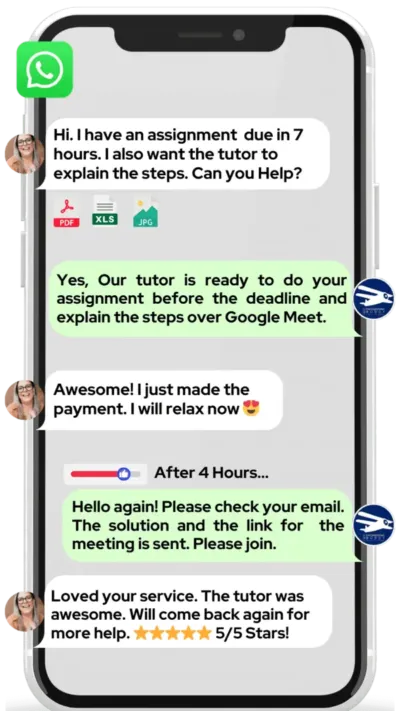
WhatsApp MEB for a quick quote — average response time under 1 minute.
Who This Ansys Mechanical APDL Tutoring Is For
Ansys Mechanical APDL tutoring at MEB covers everyone from third-year undergrads running their first static structural analysis to PhD students building custom element routines. If APDL is blocking your progress, that’s the entry point.
- Undergraduate engineering students with an FEA coursework deadline approaching
- Graduate and PhD students whose thesis simulation keeps failing to converge
- Students retaking after a failed first attempt at an FEA-based module
- Engineers transitioning from GUI-based tools to APDL scripting for the first time
- Students with a university conditional offer depending on passing their engineering simulation module
- Research students at institutions like MIT, TU Delft, Imperial College London, Georgia Tech, University of Toronto, ETH Zurich, or UNSW who need APDL support outside standard lab hours
- Guided project support — the tutor explains the method, you build and submit your own model
At MEB, we’ve found that APDL students who struggle aren’t missing FEA theory — they’re missing the link between the physics and the syntax. The tutor’s job is to close that gap fast, not re-teach the textbook.
1:1 Tutoring vs Self-Study vs AI vs YouTube vs Online Courses
Self-study works if your error messages are googleable — most aren’t. AI tools explain APDL commands quickly but can’t watch you build the wrong mesh and tell you why it’ll fail. YouTube covers introductory static analysis well and stops there. Online courses are paced for beginners with no deadline pressure. 1:1 tutoring with MEB is calibrated to your exact APDL version, your model, your error — live, in the session, fixed before you log off.
Outcomes: What You’ll Be Able To Do in Ansys Mechanical APDL
After working through APDL with an MEB tutor, you’ll be able to build and solve structural models from scratch using correct element types and boundary conditions, analyze convergence failures and trace them to their source in the script, apply nonlinear material models and interpret force-displacement results, present simulation outputs — stress contours, deformation plots, reaction forces — in a way that holds up to academic or professional scrutiny, and model thermal or coupled-field problems using APDL commands without relying on GUI workarounds.
Based on feedback from 40,000+ sessions collected by MEB from 2022 to 2025, 58% of students improved by one full grade after approximately 20 hours of 1:1 tutoring in subjects like Ansys Mechanical APDL. A further 23% achieved at least a half-grade improvement.
Source: MEB session feedback data, 2022–2025.
Try your first session for $1 — 30 minutes of live 1:1 tutoring or one homework question explained in full. No registration. No commitment.
WhatsApp MEB now
and get matched within the hour.
What We Cover in Ansys Mechanical APDL (Syllabus / Topics)

Track 1: APDL Fundamentals and Structural Analysis
- APDL syntax: parameters, arrays, do-loops, if-then branching
- Element type selection: PLANE182, SOLID185, BEAM188, SHELL181, LINK180
- Preprocessor workflow: geometry, meshing, material properties, sections
- Boundary conditions and load application via APDL commands
- Static structural analysis: solving and reviewing nodal/element results
- Modal analysis: natural frequencies, mode shapes, participation factors
- Post-processing: PLNSOL, PRNSOL, result extraction, path operations
Core references: ANSYS Mechanical APDL Command Reference (Ansys Inc.); Finite Element Procedures by Bathe; Introduction to Finite Elements in Engineering by Chandrupatla & Belegundu.
Track 2: Nonlinear Analysis and Advanced Simulation
- Geometric nonlinearity: large deflection, stress stiffening (NLGEOM,ON)
- Material nonlinearity: plasticity models (bilinear, multilinear isotropic hardening)
- Contact mechanics: contact pair setup, CONTA174/TARGE170, friction coefficients
- Convergence control: substep settings, line search, Newton-Raphson options
- Transient structural analysis: time-stepping, inertia effects, damping
- Buckling analysis: linear Euler buckling vs nonlinear arc-length method
- Fatigue and fracture: stress intensity factors, KCALC command usage
Core references: Nonlinear Finite Element Analysis of Solids and Structures by de Borst et al.; ANSYS Mechanical APDL Theory Reference (Ansys Inc.); Computational Methods for Plasticity by de Souza Neto et al.
Track 3: Thermal, Coupled-Field, and Parametric Studies
- Steady-state and transient thermal analysis using SOLID70, SHELL131
- Thermal boundary conditions: convection (SF command), heat flux, radiation
- Coupled thermal-structural analysis: sequential and direct coupling approaches
- Parametric design studies using APDL loops and parameter tables
- Scripted geometry variation: automating mesh and load changes across cases
- Ansys CFX and Ansys Fluent comparison — when to move from Mechanical APDL to a dedicated CFD solver
- Result export and post-processing scripting for batch reporting
Core references: A First Course in the Numerical Analysis of Differential Equations by Iserles; Heat Transfer by Cengel; ANSYS Mechanical APDL Thermal Analysis Guide (Ansys Inc.).
MEB also covers the Ansys platform more broadly, including computer-aided engineering (CAE) workflows that sit alongside APDL.
Platforms, Tools & Textbooks We Support
Ansys Mechanical APDL runs as both a standalone environment and within the Ansys Workbench framework. MEB tutors support both interfaces, including APDL command insertion inside Workbench Mechanical. Sessions run on Google Meet with a shared screen — tutors use a digital pen-pad to annotate scripts and mesh visuals in real time. Students share their .db files, .log files, or .mac scripts before the session so the tutor can diagnose the issue before the hour starts.
Supported environments and tools: Ansys Mechanical APDL (standalone), Ansys Workbench with APDL command objects, APDL scripting editors, Ansys Student license, university HPC cluster job submissions, result viewers (Ansys GUI post-processor, external .rst file readers).
What a Typical Ansys Mechanical APDL Session Looks Like
The tutor opens by checking where you got stuck in the previous session — usually a specific APDL command, a mesh quality issue, or a solver convergence error. From there, you share your screen and walk through the model together. If your SOLID185 mesh is showing excessive distortion or your contact pair isn’t transferring load correctly, the tutor identifies the source line by line. They annotate on a digital pen-pad while you replicate the correction in your own file. By the end, you’ve fixed the immediate problem, understood why it happened, and been given a specific scripting task — usually a parametric variation or a boundary condition modification — to attempt before the next session.
How MEB Tutors Help You with Ansys Mechanical APDL (The Learning Loop)
Diagnose: In the first session, the tutor reviews your existing APDL script or model — element choices, boundary condition logic, solver settings — and identifies exactly where the analysis is failing or where conceptual gaps are slowing you down.
Explain: The tutor works through the corrected approach live, using a digital pen-pad to annotate element connectivity, load paths, or stress result interpretation. No slides. No recorded lectures. The explanation is built around your specific file.
Practice: You attempt the correction or the next modelling step while the tutor watches. If the syntax is wrong or the element formulation is off, the tutor catches it before you run a four-hour solve that fails at step one.
Feedback: Every error gets a root-cause explanation — not just “change that line.” You’ll know whether the issue is element incompatibility, incorrect KEYOPT settings, or a meshing strategy that doesn’t suit nonlinear contact.
Plan: The session closes with the next modelling objective, a specific APDL command or analysis type to attempt independently, and a note on what the following session will cover. Progress is tracked across sessions.
Sessions run over Google Meet. The tutor uses a digital pen-pad or iPad with Apple Pencil. Before the first session, share your APDL script or .db file, the error message you’re seeing, and your project brief or assignment description. The first session starts with a diagnostic — the tutor will not spend time on background you already know. Start with the $1 trial — 30 minutes of live tutoring that also serves as your first diagnostic.
Whether you need a quick fix before a submission deadline, structured support over 4–8 weeks for a thesis chapter, or ongoing weekly help through the semester, the tutor maps the session plan after that first diagnostic.
Students who come to MEB with a stalled APDL model and no clear path forward typically have two things in common: they understand the physics, but they’ve never been shown how the APDL command structure translates theory into a solvable model. One session changes that.
Source: My Engineering Buddy, 2008–2025.
Students consistently tell us that the moment APDL “clicks” — when they understand why the element type choice drives the whole mesh strategy — their confidence with simulation changes permanently. That moment usually happens inside a 1:1 session, not from reading the manual alone.
Tutor Match Criteria (How We Pick Your Tutor)
Not every FEA engineer knows APDL scripting. MEB’s matching process filters for both.
Subject depth: Tutors are matched to your specific analysis type — structural, thermal, nonlinear, or coupled-field — not just “Ansys” in general. A tutor covering contact mechanics has different depth than one covering modal analysis.
Tools: Every tutor uses Google Meet with a digital pen-pad or iPad and Apple Pencil — live annotation on your actual script, not a generic whiteboard.
Time zone: Matched to your region. US, UK, Gulf, Canada, and Australia all have active tutor availability.
Goals: Whether you’re fixing a convergence error, building a full thesis simulation, or learning APDL scripting from scratch, the tutor selection reflects that specific goal — not a generic “simulation tutor” assignment.
Unlike platforms where you fill out a form and wait, MEB responds in under a minute, 24/7. Tutor match takes under an hour. The $1 trial means you test the fit before committing to a package. Everything runs over WhatsApp — no logins, no intake forms, no waiting room.
Pricing Guide
Ansys Mechanical APDL tutoring starts at $20/hr for undergraduate-level static analysis and scripting support. Graduate-level nonlinear simulation, contact mechanics, or multiphysics coupling typically runs $40–$70/hr. PhD-level or research-grade APDL work — custom element routines, UPF user-programmable features, HPC batch scripting — can reach $100/hr. Rate factors include your analysis type, complexity, timeline urgency, and tutor availability.
Availability is limited during semester-end periods and thesis submission windows — reaching out early gives you more tutor options at standard rates.
For students targeting graduate engineering programmes at institutions like ETH Zurich, TU Delft, or Georgia Tech where simulation competency is assessed, tutors with research and industry simulation backgrounds are available at higher rates — share your specific project or thesis scope and MEB will match the right tier.
Start with the $1 trial — 30 minutes, no registration, no commitment. WhatsApp MEB for a quick quote.
FAQ
Is Ansys Mechanical APDL hard to learn?
APDL is harder than GUI-based FEA because it requires you to understand both the physics and the scripting syntax at the same time. Most students hit a wall at element selection or convergence settings. With a tutor, the learning curve compresses significantly — most students are writing working scripts within 3–5 sessions.
How many sessions do I need?
For a specific project fix — wrong element type, failed convergence, incorrect boundary conditions — one to three sessions usually resolves it. For building solid APDL competency from scratch, 10–15 hours over 4–6 weeks is a realistic target. The diagnostic session sets the plan.
Can you help with my APDL project and simulation work?
Yes. MEB provides guided project support — the tutor explains the method, identifies errors, and walks you through the correct approach. All model building and submission is done by you. See our Policies page for full details on what we help with and what we don’t.
Will the tutor match my exact syllabus or simulation software version?
Yes. Share your course outline, university software version (Ansys 2022 R2, 2023 R1, etc.), and the analysis type your assignment requires. The tutor is matched to that specification — not assigned generically from an “Ansys” pool.
What happens in the first session?
The tutor reviews your existing script, model, or error log — whichever you share beforehand. The diagnostic takes roughly 10 minutes, then the remaining time is spent fixing the immediate problem and mapping what the next sessions need to cover. No time is wasted on background you already know.
Is online APDL tutoring as effective as in-person?
For simulation and scripting work, online is often better — screen sharing lets the tutor see your exact file, error messages, and mesh. There’s no ambiguity from a whiteboard sketch. The digital pen-pad annotation on your actual model is more direct than anything an in-person session offers with a shared laptop.
What’s the difference between Ansys Mechanical APDL and Ansys Workbench — and which should I learn?
Workbench has a GUI-driven workflow; APDL gives you full scripting control and access to advanced solver options not exposed in Workbench. Most graduate-level simulation and research work requires APDL fluency. MEB tutors cover both and can advise on which suits your specific project or course requirement.
Can you help with APDL scripting for parametric or optimisation studies?
Yes. Parametric studies using APDL loops, parameter tables, and automated result extraction are a common tutoring request. The tutor will walk through the scripting logic, help you structure the do-loop correctly, and troubleshoot output extraction commands for batch runs.
Can I get Ansys Mechanical APDL help at midnight?
Yes. MEB operates 24/7 across time zones. WhatsApp MEB at any hour — average first response is under a minute. Tutors are available across US, UK, Gulf, and Australian time zones, so late-night help before a submission deadline is a normal part of how MEB works.
What if I don’t get along with my assigned tutor?
Request a replacement — no questions asked. MEB’s WhatsApp model means this takes minutes, not days. A different tutor from the same subject pool is matched immediately. The $1 trial is specifically designed to surface any fit issues before you commit to paid sessions.
How do I find an Ansys Mechanical APDL tutor in my city?
You don’t need one locally. Every MEB session runs online over Google Meet with full screen-sharing and digital pen annotation. Students in Houston, London, Toronto, Dubai, Sydney, and Amsterdam all access the same tutor pool. Your city doesn’t limit your options.
How do I get started?
WhatsApp MEB with your analysis type and deadline. MEB matches you to a verified APDL tutor — usually within the hour. The $1 trial runs first: 30 minutes of live tutoring or one project problem explained in full. No registration. No commitment.
Trust & Quality at My Engineering Buddy
Every MEB tutor goes through subject-specific screening — not a general engineering interview. For Ansys Mechanical APDL, that means demonstrating hands-on fluency with APDL scripting, FEA element formulation, nonlinear solver settings, and post-processing workflows. Tutors are evaluated through a live demo session before being assigned to students, and session feedback is reviewed continuously. Rated 4.8/5 across 40,000+ verified reviews on Google.
MEB provides guided learning support. All project work is produced and submitted by the student. See our Policies page for details.
MEB has served 52,000+ students across the US, UK, Canada, Australia, the Gulf, and Europe since 2008 — across 2,800+ subjects. In the computer-aided engineering space, MEB covers simulation tools including HyperMesh and STAR-CCM+ alongside Ansys Mechanical APDL — all with the same tutor-matching standard. Read more about the platform at Why MEB and the tutoring methodology behind it.
MEB has matched APDL students with expert simulation tutors since 2008 — covering structural, thermal, nonlinear, and coupled-field analysis across undergraduate, graduate, and research levels in the US, UK, Canada, Australia, and the Gulf.
Source: My Engineering Buddy, 2008–2025.
A common pattern our tutors observe is that students blame the software when the real issue is an incorrect KEYOPT setting or a mesh density that’s too coarse for the physics. That diagnosis — and the fix — takes about 20 minutes with the right tutor.
Explore Related Subjects
Students studying Ansys Mechanical APDL often also need support in:
Next Steps
Before your first session, have ready: your Ansys version and course outline (or project brief), a recent APDL script or error log you’ve been stuck on, and your submission or exam deadline. The tutor handles the rest.
- Share your analysis type, specific error or gap, and time zone
- MEB matches you with a verified APDL tutor — usually within the hour
- First session starts with a diagnostic so every minute is used well
Visit www.myengineeringbuddy.com for more on how MEB works.
WhatsApp to get started or email [email protected].
52,000+ Happy Students From Various Universities





Reviewed by Subject Expert
This page has been carefully reviewed and validated by our subject expert to ensure accuracy and relevance.